Runtime Errors (CygNet Studio)
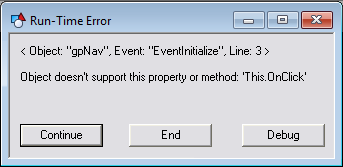
If a line of script attempts to perform some invalid action, a runtime error will occur. An example of this type of condition is trying to access a negative array index, or referring to a property of an object that doesn’t exist. Because syntax errors are caught by the script editor before the screen can be run, runtime errors will never relate to syntax. When a runtime error occurs, the following window will appear.
|
| Runtime Error |
You are given several options at this point. Note that a description of the error is provided below the object, event, and line number. You can use this information to determine what to do next.
Click Continue to skip the code that triggered the error and leave the screen running. Depending on the nature of the error, the screen might continue to run normally, or the skipped code might cause problems.
Click End to terminate execution of the screen. Doing this will launch the script mini-editor with the erroneous line selected. If you don’t want to navigate to the line later, you can edit the script at this point. However, when you close the mini-editor, the screen will return to Edit mode.
The third option is to debug the script. By clicking Debug, you’ll be given a list of VBScript debugging applications that are available on your system. Select an application to open the script for debugging, then use the debugger to step through code and view or change values as you go. See Script Debuggers for information about debugging script.
Runtime errors can be trapped using the VBScript "On Error" statement.

